My Claude Sessions Leave a Note on the Way Out
A normal day for me looks like this: a Claude Code session on one project in the morning, a different session on a different project after lunch, a quick fix on something unrelated, maybe a late-night tinker on a side project. Each one is focused while it's happening. Each one fades a little the moment I close the terminal.
So the next morning, when standup rolls around, I want a quick refresher. Not because I forgot what I did. More that reconstructing the shape of yesterday from a git log is a terrible use of five minutes, and I'd rather glance at a short recap and talk from there.
That's what this little two-part setup does: a hook that logs every Claude Code session as it ends, and a standup command that synthesizes those logs into something I can skim before I open my mouth.
Part 1: The SessionEnd Hook
Claude Code has a SessionEnd hook that fires when a session closes. It hands you the transcript path, a session ID, and a reason. Everything you need to write a little work log entry.
Here's the loop:
- Read the transcript from stdin
- Skip it if it's a subagent session (I don't care about those, they're noise)
- Skip it if it's tiny (a quick question isn't worth logging)
- Parse out the signal: user messages, tool calls, and the assistant's longer text blocks
- Feed that to
claude -pto summarize - Append to a daily markdown file:
~/Documents/claude-work-logs/YYYY-MM-DD.md
The whole thing lives in ~/.claude/hooks/session-end-logger.sh. A few design decisions turned out to matter more than I expected.
Background the heavy work. The first version ran the summary synchronously. Meaning: every time I closed a Claude session, I'd sit there for 10-15 seconds while claude -p thought about my transcript. That's unusable. Now the hook forks the work into a background subshell, disowns it, and exits immediately. Claude Code closes instantly. The summary trickles into the log file whenever it's done.
# Background the heavy work (transcript parsing + claude -p)
# so the hook exits instantly
(
    # ...parse transcript, call claude -p, append to log file...
) &>/dev/null &
disown

exit 0
Skip agent sessions. Subagents (Task tool invocations) also fire SessionEnd. Without filtering, every agent I spawned would generate its own log entry, and my daily log would look like a conversation with myself. The fix is a grep '"isSidechain":true' on the first line of the transcript. If it's a sidechain, bail out.
Parse the transcript smartly. My first attempt just tail'd the last 200 lines of the transcript and sent it to Claude. That worked sometimes and produced absolute garbage other times, depending on what happened to be at the tail. Now I parse the JSONL with a little Python script that pulls out high-signal events (user messages, tool uses with their targets, and the longer assistant text blocks) and discards the rest. The summaries got noticeably more accurate once the input was clean.
Have a fallback. If the Python parser blows up, fall back to tail. If claude -p fails, write "summary generation failed" and move on. The hook should never interrupt your flow, even when it's broken.
The output is a markdown file per day, with one section per session:
# Work Log - April 22, 2026

## 09:14 - personal-lab
- Added dark mode toggle to writing layout
- Fixed inline code contrast in light theme
- Updated MDX components to use new Tailwind tokens

---

## 11:32 - api-balance-dashboard
- Wired up Inngest cron for OpenAI balance polling
- Handled 429 rate limits with exponential backoff
- Added Neon connection pooling config

---
Every session I run gets quietly appended to that day's file. I don't think about it. I just... keep coding, and at the end of the day there's a record.
Part 2: The Standup Command
The logs are nice on their own, but they're still raw material. For standup I don't want a wall of bullets from every project I touched. I want three or four sentences that sound like a human summarizing their day.
That's what standup-command.sh does.
standup           # yesterday (the default, standup is in the morning)
standup today     # what I've done so far today
standup week      # past 7 days, concatenated
standup 2026-04-15   # specific date
It reads the log file(s), wraps them in a prompt, and sends them to claude -p with a format I can actually paste into a standup channel:
## 📋 Standup Summary - April 22, 2026

### ✅ What I Did
- Shipped dark mode across the writing surface of personal-lab
- Landed the OpenAI balance poller in api-balance-dashboard
  (cron + rate-limit handling)
- Chipped away at an MDX component refactor

### 🎯 Key Highlights
The balance poller is the big one. It's the last blocker
before the dashboard has real data to render.

### 🚧 Blockers/Issues
None.
Two small touches that make it work in practice:
Ignore the noise. The prompt explicitly tells Claude to skip entries that say "Error generating summary" or "Brief session". Those are artifacts from the hook falling back. Without that filter, half-failed log entries started showing up as "worked on error handling" in the standup, which is both wrong and hilarious.
Group, don't list. The prompt asks for 3-5 accomplishments, not 3-5 bullets. The difference matters. A day where I touched eight files might be one accomplishment ("refactored the MDX layer") and the summary reads that way instead of an inventory.
The weekly mode is the sleeper feature. When I'm writing an async status update or trying to remember which project I last touched a particular thing in, I run standup week and it hands me a clean overview I can read off of or use as a jumping-off point to pick up where I left off.
Why This Setup and Not Something Fancier
I could have built this as a proper tool. A database. A dashboard. A web UI with charts. A vector store so I could ask "when did I last touch auth?" in natural language.
I didn't, and I'm glad.
The whole thing is two bash scripts and a folder of markdown files. The data is grep-able. The logs are readable on their own, with or without the summarizer. If Claude Code changes its hook format tomorrow, I've got a week to fix a shell script, not migrate a database. And if I decide in six months that I want the fancier version, I'll have months of training data sitting in plain markdown, ready to import anywhere.
Markdown files in a folder keep beating the alternatives for this kind of thing. They're boring and they work.
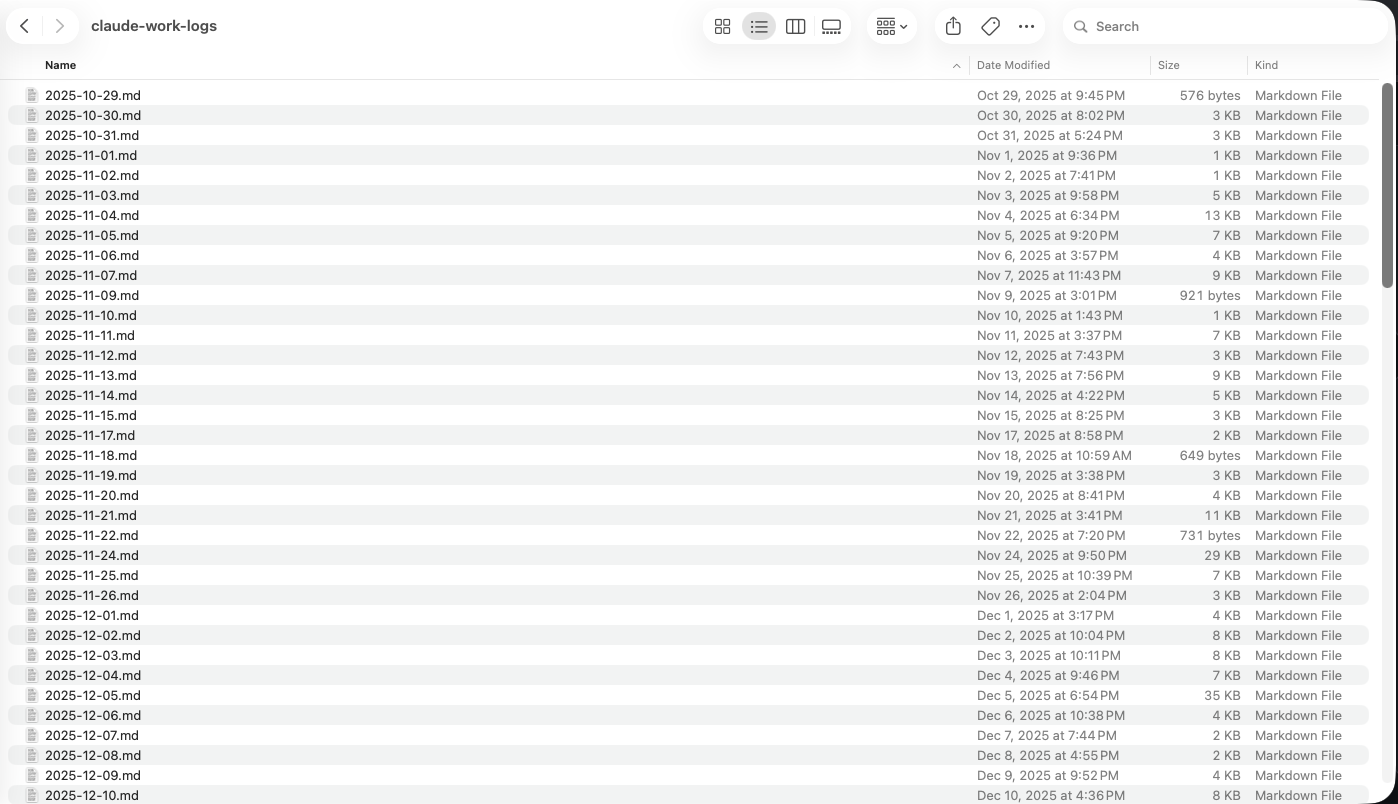
The screenshot above is my actual log folder: dated markdown files going back to October. No database, no export step, no vendor to break up with. Just a quietly growing archive of what I've been doing.
The Actual Win
The hook and the command are both small. A hundred lines of bash each, nothing clever. But the workflow they create (code all day without thinking about logging, then pull up a recap whenever I need one) has quietly become one of the most useful things in my setup.
In the morning I open the recap, skim it, and walk into standup already knowing what I want to say. For a weekly update I run standup week and use it as the outline instead of the blank page. And when I'm bouncing between side projects and lose track of which thread I was on, the logs are right there to remind me.
Hook, command, markdown files in between. That's the whole thing, and it's been quietly doing its job for weeks.