PaceTime: Quick Pace Projections for Runners
I run. Nothing serious, just a few times a week with no race on the calendar. But every time I'd want to play with a number, like figuring out what an 8:30 pace gets me over a half or what pace I'd need to break 50 minutes in a 10K, I'd end up on one of those 1998-era pace calculator sites. Tiny form, submit button, wall of numbers, ads down the side. Want to share the result with someone? Screenshot it.
The math is trivial. The tool around it shouldn't be ugly, and it shouldn't be unshareable.
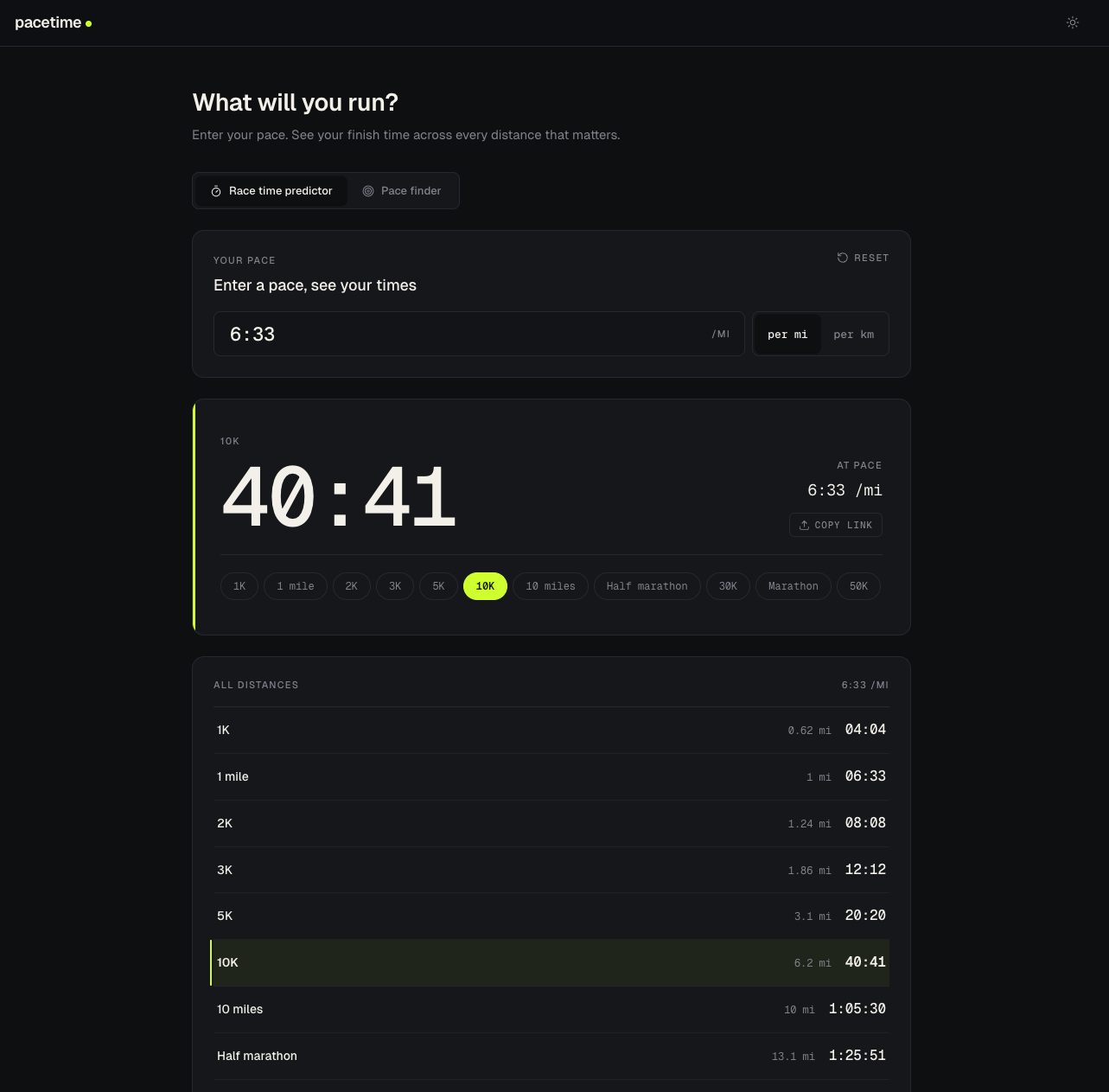
That's what pacetime.run is. A clean pace calculator where every calculation is its own URL.
https://pacetime.run/5:30/km/half
That link doesn't just open the app. It opens the app with that exact calculation already loaded. And if you paste it in iMessage, the link preview reads 5:30 /km → 1:56:02 half marathon, baked into the image.
Two Calculators in One
There are two tools sharing a tab strip:
Race Time Predictor. Type in a pace, see projected finish times across every distance from 1K to 50K. Useful for the kids' races, useful for picking a goal pace for an adult race, useful for "if I hold this pace, how long is the long run actually going to take?"
Pace Finder. Type in a distance and a goal time, get the pace you need to hit, with per-km and per-mile splits. "I want a 3:30 marathon" → "8:00 /mi, 4:58 /km, here are your splits."
Eleven preset distances cover the standard adult races, but you can type any custom distance too. Handy for school meets and the trail races that come in odd fractional miles.
The URL Is the State
Every change to either calculator rewrites the URL. The URL path is the calculation:
| URL | What it means |
| --- | --- |
| /5:30 | 5:30 /mi pace, predicting marathon |
| /5:30/km | 5:30 /km pace |
| /5:30/km/half | 5:30 /km, half featured |
| /f/marathon/3:30:00 | Finder: marathon, 3:30 goal |
| /f/10k/km/50:00 | Finder: 10K, km display, 50:00 goal |
| /f/2k/12:00 | Finder: 2K, 12-minute goal |
Defaults get omitted, so a fresh page is just /. The moment you actually do something the URL becomes meaningful, and you can paste it anywhere.
The encoder/decoder lives in a small pure module that's unit-tested both ways. State → URL → state round-trip for stability, plus parsers for three URL formats so links shared from the very first version of the app still work today (current path style, an older hash style, and the original query-string version). Old links get silently migrated to the path form via history.replaceState on load.
The state cascade on load is defaults < localStorage < URL. That's the right priority: a shared link always beats your stale local session, because the link is what the sender meant.
The Part I'm Most Proud Of: Dynamic Share Previews
When you paste a regular SPA link into iMessage or Slack or Twitter, you usually get back a generic site card. Just a logo, tagline, no detail. That's because crawlers don't run JavaScript. They request the page, see an empty <div id="app">, and shrug.
PaceTime sidesteps that with two server-side pieces, both required:
An edge function intercepts every page request, decodes the URL into a calculation, computes the result, and rewrites <title> plus every <meta og:*> and <meta twitter:*> tag before the HTML hits the crawler. Static assets (PNG, SVG, JS, CSS) bypass the rewrite via a content-type check so the rest of the site doesn't pay for it.
A serverless function at /api/og generates the actual preview image. It decodes the same state, builds an SVG with Satori, rasterizes it to PNG with resvg-js, and returns the bytes with Cache-Control: max-age=31536000, immutable. Every unique URL maps to one forever-cached image. Cold-start cost amortizes across infinite shares.
Both pieces share a single og-state.ts module, so the headline math has exactly one source of truth. Otherwise the image and the meta tags would inevitably drift, and you'd be shipping previews that confidently lied about the pace.
Paste a URL into a chat and the preview card actually shows the answer. The same link renders correctly anywhere that asks for an OG card. Facebook, WhatsApp, Twitter, Discord, LinkedIn, Pinterest:
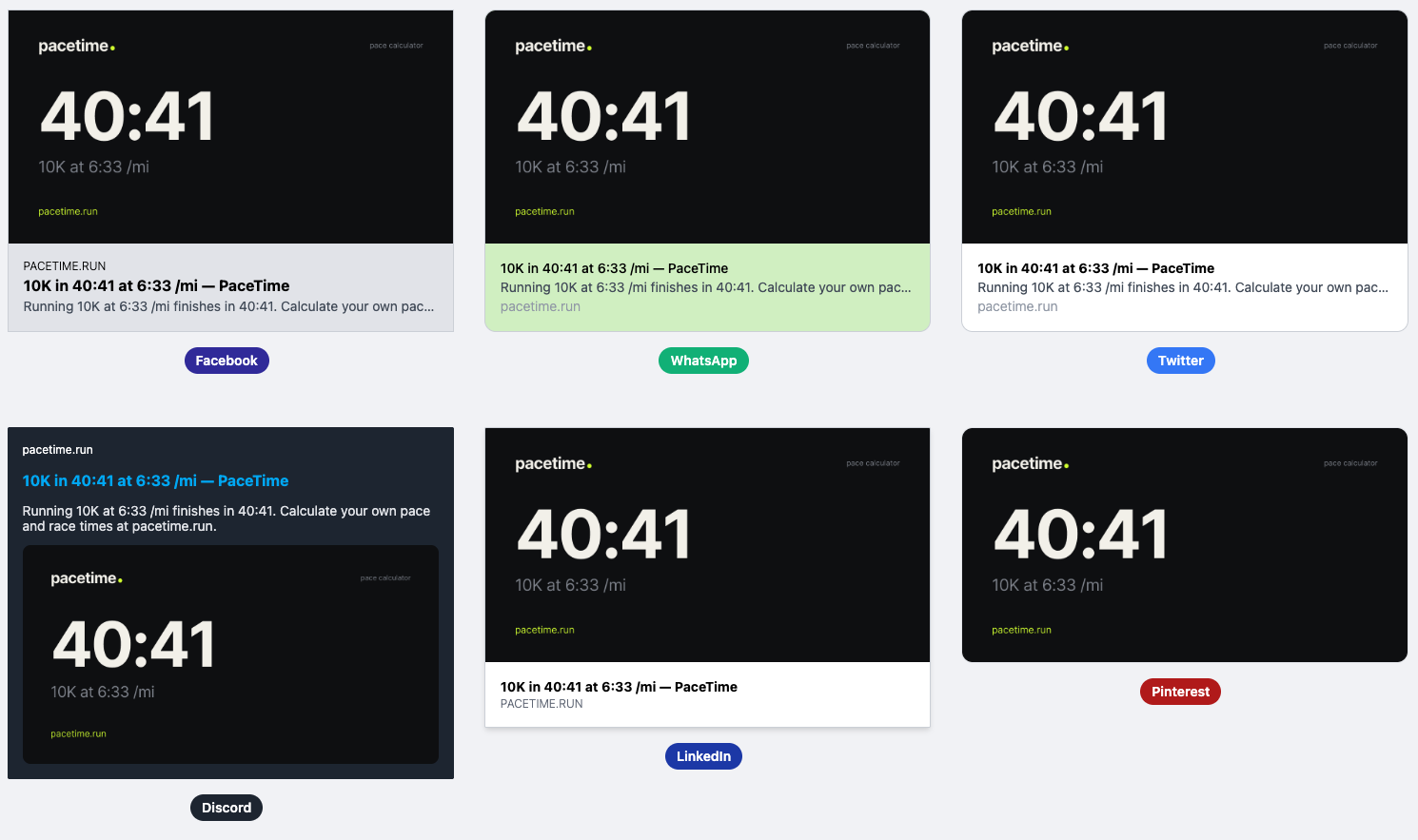
Small thing. Felt like magic the first time it worked end to end.
What's Under the Hood
- Vite + Vue 3 + TypeScript + Tailwind. SPA, deployed on Netlify.
- Tokens-first styling. A
tokens.cssdefines brand primitives and semantic vars (--background,--card,--border…); components reference only the semantic ones. Dark mode flips a subset via.darkon<html>and is the default. useCalculatorState. A Vue composable that wraps the pure URL encoder in a reactive object plus a watcher. Every change writes to bothlocalStorageand the URL path.matchKnownDistance. Snaps user input to a preset when it lands within 0.01, so picking "10K" and toggling units doesn't drift to 9.99 km. This bit me twice during development.- 61 unit tests, ~160ms. All on the pure functions: formatting, encoding, decoding, the OG headline pipeline. The Vue components don't have tests because the calculation is the part that has to be right.
The Whole Pitch
Most pace calculators are accurate but ugly, and the result of any calculation is a screenshot. PaceTime is the version I wanted: clean UI, instant feedback, and every number you compute is a URL you can paste anywhere, with a preview card that already shows the answer.
Try it: pacetime.run.